Our New Florida Patient Portal is Coming!

You will receive an email from your practice(s) when it is time to register for the new patient portal. We’re launching this to streamline your experience with your Privia Medical Group - Florida providers. The new patient portal will be rolled out over the next few months; please scroll down to see when your practice will launch the new portal.

On the new patient portal, you can:

  Book appointments with your Privia providers

  Review and pay bills for care given after the launch date

  Message providers for non-emergency matters

  Access information related to appointments after the launch date.

New Patient Portal Launch Dates

If you visit multiple practices within Privia Medical Group - Florida, you may receive an email from each one asking you to register for the new Patient Portal. You only need to register for the new Patient Portal once.

Launch Date: November 2

  • Advanced Podiatry and Neuropathy Center, LLC
  • Allergy, Asthma, Clinical Immunology, and Sinus Center, PLLC
  • Altavida Obstetrics and Gynecology LLC
  • Doc PAM, P.A.
  • Dupont Medical LLC
  • ReEnvision PT
  • Jeremy D. McConnell, MD, PA
  • Lakemont Pediatrics, LLC
  • Paradise Pediatrics Healthcare, PLLC
  • Parveen S Vahora MD PA
  • Tampa Bay Neurology Inc.
  • TBNC Inc

Patient Portal

Launch Date: November 16

  • Advanced Pediatric Care, PLLC
  • Beaches Pediatrics, P.A.
  • Beachside Pediatric Associates, PA
  • Benton Pediatrics, Inc
  • Capital Pediatrics, LLC
  • Coastal Pediatric Group, LLC
  • Jacksonville Pediatrics, P.A.
  • Kids Doc Pediatrics, PA
  • Pediatric Associates of Jacksonville, PA
  • Pediatric Associates of Ocala, P.A.
  • Sea Breeze Psychiatry LLC
  • Sprout Pediatric Care, LLC

Patient Portal

Launch Date: November 30

  • Allergy and Asthma Specialists of the Palm Beaches, LLC
  • Alvaro J. Dangond, MD, PA
  • Celsa Medical PLLC
  • Infants and Children PA
  • Miami Beach Pediatrics, P.A.
  • Southern Coast Spine Care LLC

Patient Portal

Launch Date: December 14

  • Charis Neurology LLC
  • Kidswood Pediatrics Corp.
  • Migraine and Headache Center of Florida, LLC
  • Pediatrics In Brevard, P.A.
  • Pro Star Pediatrics P.A.
  • Safari Pediatrics, P.A.
  • Zenith Women's Health LLC

Patient Portal

Launch Date: January 11

  • Dr. Huss, P.A.
  • Green Tree Family Medicine LLC
  • Omni Medical Group, PLLC
  • Optimize Medical, PLLC
  • Sunmed Group LLC

Patient Portal

Launch Date: January 25

  • Arthritis & Joint Center of Florida, LLC
  • Cocoa Beach Family Medicine LLC
  • Island Dermatology and Primary Care LLC
  • Jeffrey T. O'Brien, MD, Inc.
  • Ohana Family Practice, LLC
  • Pediatric Health & Wellness of Brevard, PA
  • Snow Family Medicine Inc.
  • Soriano Physician Services, PLLC
  • Space Coast Spine and Pain Institute LLC
  • Viera Wellness Care LLC

Patient Portal

Launch Date: February 8

  • ADM Orthopaedics, PLLC
  • Center for Pain Treatment, LLC
  • Coastal Pulmonary and Sleep Center LLC
  • E. M. Healthcare & Associates, LLC
  • Horizons Primary Care LLC
  • Oceanview Internal Medicine, LLC
  • Sullivan Sinus and Allergy, LLC
  • Vero Beach Pediatrics, LLC
  • Vitality Integrated Medical Network, LLC

Patient Portal

Launch Date: February 22

  • APS Gynecology, P.A.
  • Art Of Medicine PA
  • Bailey Family Health, PLLC
  • Families First Primary Care, Inc
  • Family Clinic, LLC
  • Farghaly Medical, PLLC
  • Healthpoint Medical Group of the Emerald Coast, LLC
  • Jax Family Health Clinic PLLC
  • JK Health Systems LLC
  • Livewell Passport of Florida, LLC

Patient Portal

Launch Date: March 8

  • Achilles Kalnoky MD PA
  • ARISES LLC
  • Bich-Ngoc T. Pham MD LLC
  • Blue Wave Medical Associates LLC
  • Holy Family Health LLC
  • LifeStream Family Medicine
  • Nurse Practitioners of Pinellas,LLC
  • Omar Aref MD PLC
  • Pedersen Medicine, LLC
  • Peninsula Pediatrics of West Florida, PLLC
  • Purposely Evolving LLC
  • STETHO MD LLC
  • Trinity Doctors Group, P.A.
  • Weecare For Kids, P.A.
  • West Orange Women’s Care, LLC

Patient Portal

Launch Date: March 22

  • Alliance Obstetrics & Gynecology Group, LLC
  • Deland Primary Care and Aesthetics, LLC
  • Dr. Phillips Medical Wellness Center, LLC
  • Horizon West Healthcare, Inc.
  • Michael A. Middleton, M.D., P.A.
  • Olga Kaliebe, MD, LLC
  • Orange Blossom Women's Group, PLLC
  • P & T Family Care, LLC
  • Pan American Medical Group LLC
  • Renaissance Partners LLC
  • We Care Health and Wellness, LLC

Patient Portal

Launch Date: April 5

  • Doctor Near Me, PLLC
  • Ernest Chung MD & Associates PA
  • Merges Medical Services LLC
  • OneMed Florida LLC
  • Patel Medical Ventures, LLC
  • PremierMED Family & Sports Medicine LLC
  • Privia Virtual Health
  • Restora Medical Corp, LLC
  • Sookdeo Family Medicine PLLC
Patient Portal

Register for the new Patient Portal

After your practice’s launch date, you will need to register for the new Patient Portal using the same email as your current portal.  

I am a patient with an existing patient portal:

  1. Go to the Patient Portal registration link found in your email or navigate to https://28757-1.portal.athenahealth.com.
  2. Click “Create an Account.” (You must follow these steps to link your existing patient record to the new portal.)
  3. Complete the registration steps:
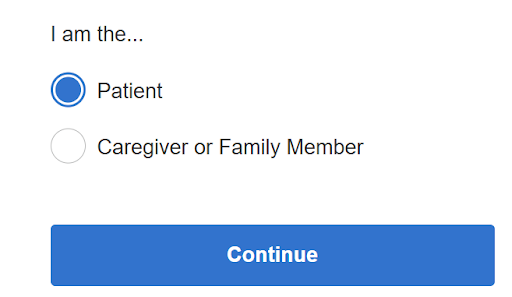
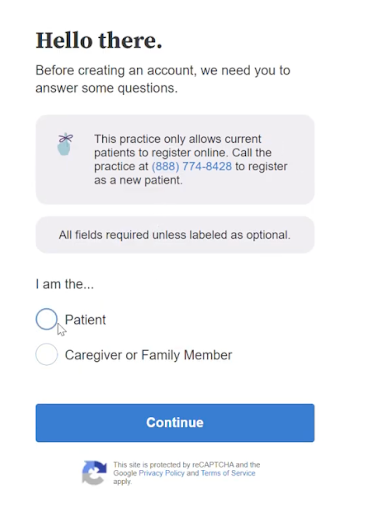
    • Select “Patient” and click “Continue.”
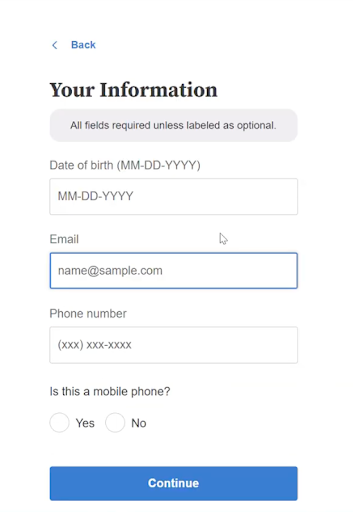
    • Enter your date of birth, and the exact email address and phone number associated with your current patient portal.

      patient

      Your Information

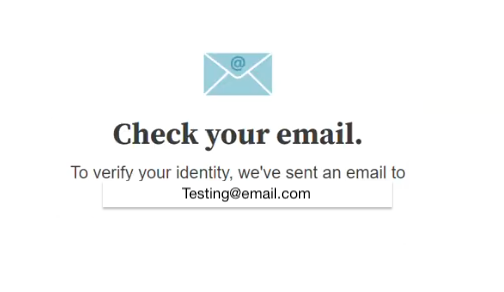
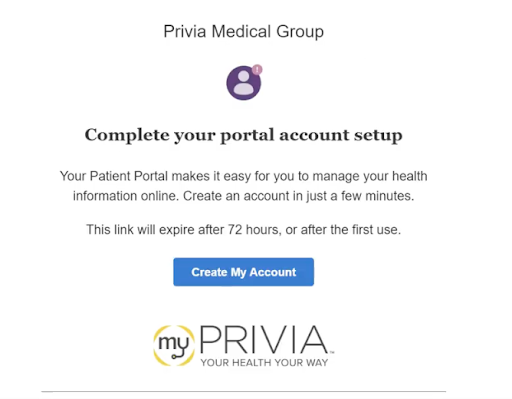
  4. Check your email for the subject line “Next steps: Patient Portal registration with Privia Health” and click the “Create My Account” button.

    Check Your Email

    Create Account

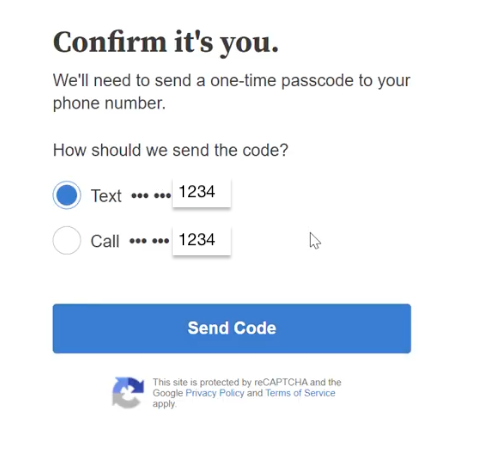
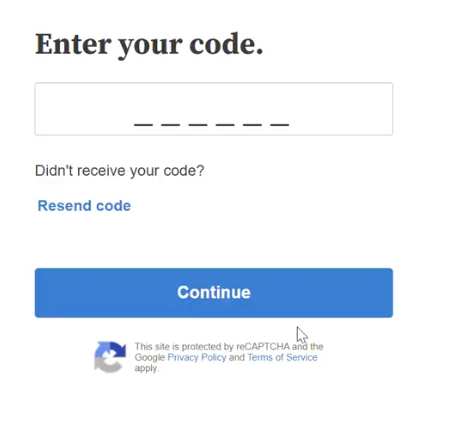
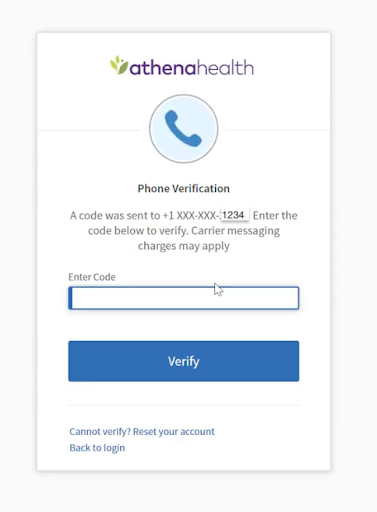
  5. Verify your identity by entering the code sent to your phone number via text or call.

    Send Code

    Enter Your Code

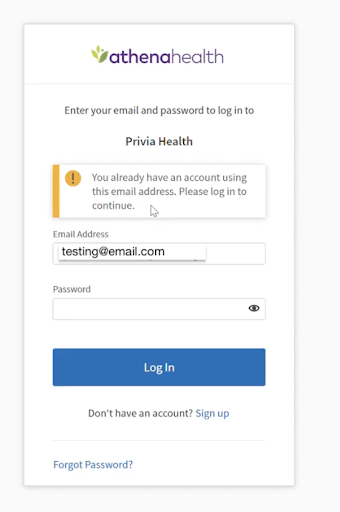
  6. You will then see an alert: “You already have an account using this email address. Please log in to continue.” This is expected.

    Athena Health Login

  7. Enter the password associated with your existing patient portal account.
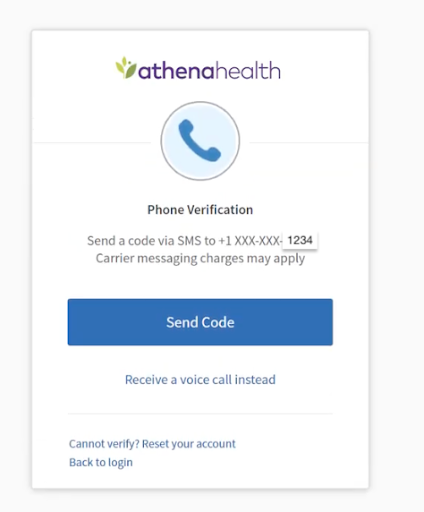
  8. You may be asked to authenticate your identity one final time via a texted code.

    Athena Health Send Code

    Athena Health Enter Code

  9. After final authentication, you should be successfully logged into your new patient portal.

I am a patient without an existing patient portal:

  1. Please contact your practice’s office and they can help get you registered for a patient portal account.

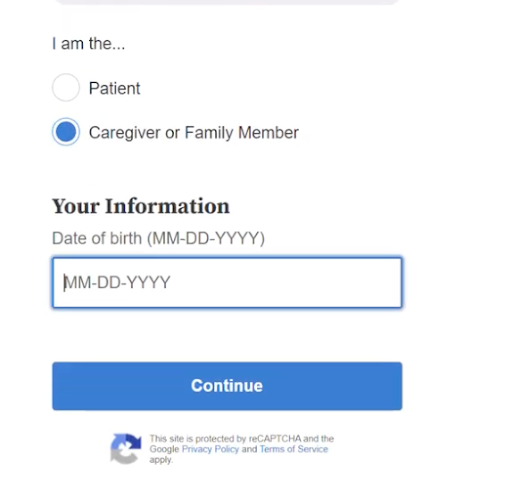
I am a caregiver/family member and need access to a child/family member’s patient portal.

  1. Note: If you are also a patient, register for your own portal first before following the steps below.
  2. Go to https://28757-1.portal.athenahealth.com click "Create an Account," and select "Caregiver or Family Member.

    Hello There

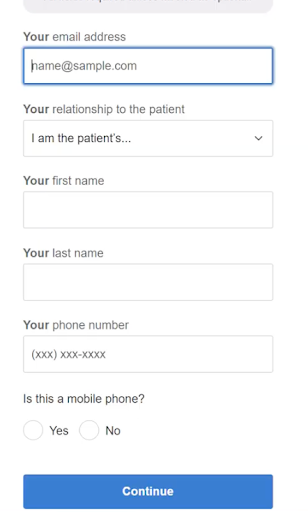
  3. Enter your demographic information (name, DOB, email, and phone) and check your email for a registration message from Privia Health to "Create My Account."

    Caregiver Information

    Information

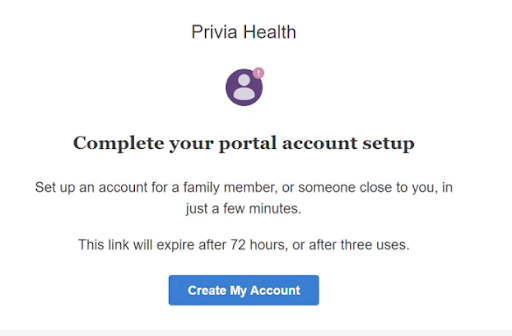
  4. An email will be sent for next steps.

    Check Your Email

  5. The email will prompt the caregiver to create a portal account.

    Complete Profile

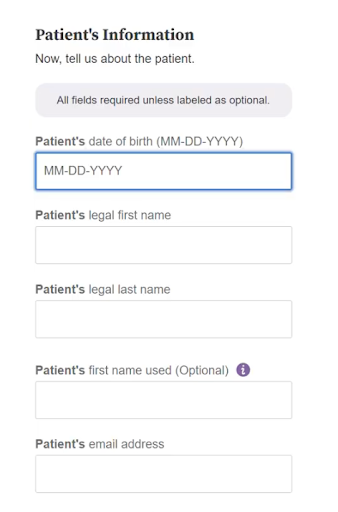
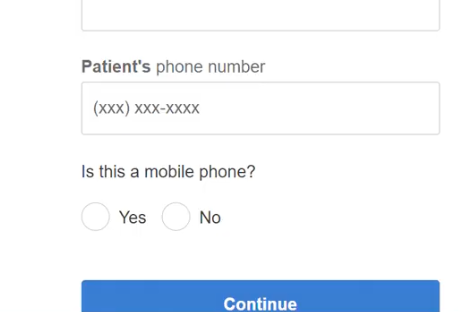
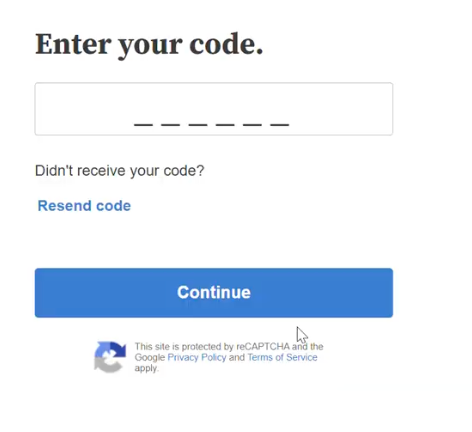
  6. Provide the patient’s details, including DOB, legal name, and phone number, then enter the verification code sent to the patient's phone.

    Patient Information

    Patient Phone Number

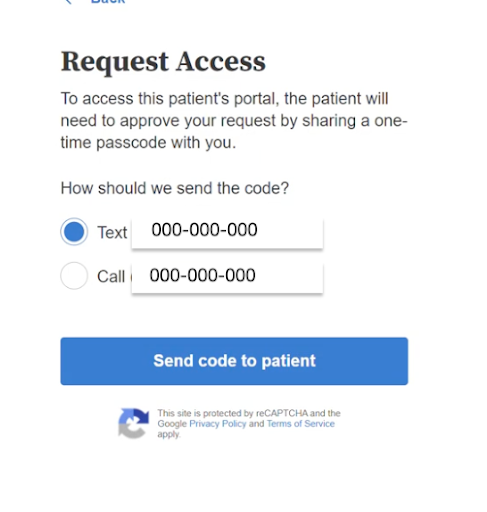
  7. The patient’s phone number will receive the verification codes. This phone number is on the patient’s Quickview in athena.

    Request Access

    Enter Your Code

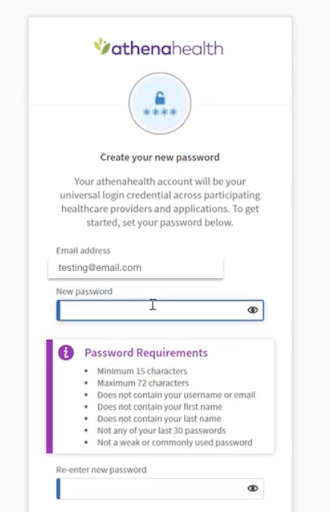
  8. Contacts can set a new password for the portal account.

    Athena Create New Password

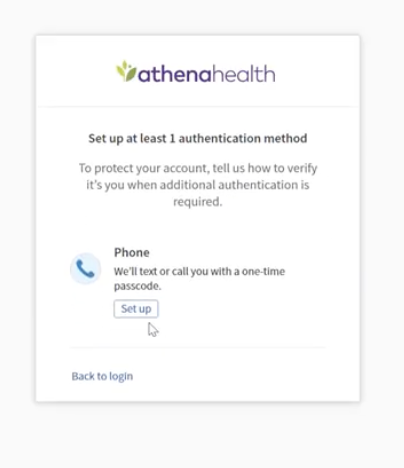
  9. Two factor authentication can be set up by the contact.

    Authentication

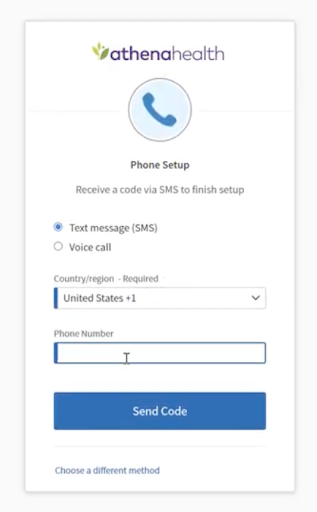
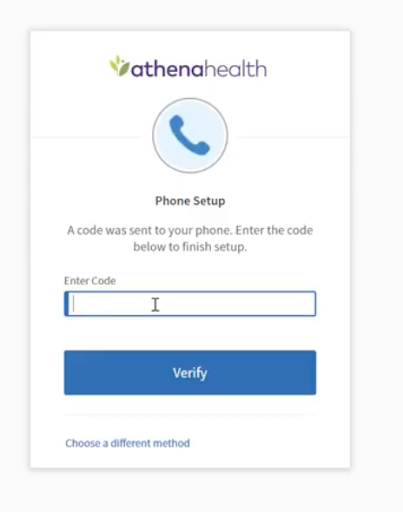
  10. Enter a phone number and then verification code.

    Athena Health Phone Setup

    Athena Enter Code

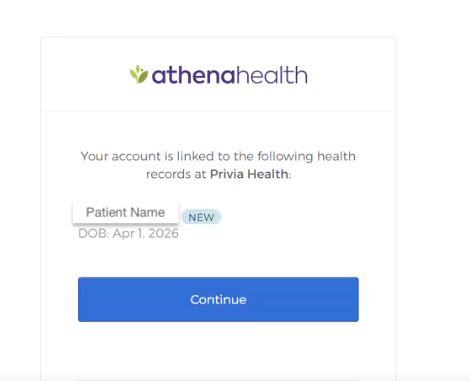
  11. Next you’ll see the patient that your portal is being linked to as a contact.

    Athena Patient Name

  12. They’ll be redirected to the portal homescreen.
  13. Once logged in, use the dropdown menu in the top right corner to switch to your child or family member’s name under "Switch To View."
  14. Repeat this process for each additional child or family member requiring portal access.

What Happens to Your Existing Portal & Health Data

Care summaries and bills for care provided before the new portal launch date will not be available in the new patient portal.

Access your old portal here where you can:

  • View care summaries and message history prior to the new portal launch date.
  • Submit payment for services received prior to the new portal launch date.
     

Frequently Asked Questions

  • If you have not done so already, you can register for the new patient portal using the same email as your existing portal here.

  • The new patient portal may not be live for the care center that you see. Please check the dates on this page and try registering for the new patient portal after the documented date has passed.
  • Ensure you are using the same email address that you used to login to your old patient portal.
  • If you are seeing the following error: “You already have an account using this email address. Please log in to continue,” try logging in using your existing portal email and password or resetting your password using the Forgot Password workflow.
  • If you are seeing "No record found. This practice only allows current patients to register online,” please contact your practice’s office and they can help you register for the new patient portal.

  • This is because one or more practices that you or your family members get care from have recently launched the new patient portal.
  • If you have already registered for the patient portal, you do not need to register again and can disregard the emails.

  • After you register for your new Patient portal account, you can login here.

  • If you are seeing the following error: “Login information is incorrect” confirm you are entering the email address that you used to register for the portal and your correct password.
  • Try resetting your password using the Forgot Password workflow.

  • Complete the create an account process as outlined in the workflows above. You must have the patient's demographic details to successfully gain access to their patient portal.

  • Complete the create an account process as outlined in the workflows above for each child/family member.

  • You can access information in your old portal here.
  • Note: Please use the new Patient Portal to communicate with your care team or book an appointment, as this functionality will not be available in the old patient portal.

  • Make a payment on the QuickPay portal using the statement code found on your bill.
  • Or, log into your old portal account here or call 888-774-8428 (Option 2). 

  • Once your practice launches the new portal and after you have registered your account, you will have access in the myPrivia mobile app to book/manage appointments, message your care team, and more. You will not be able to access your previous portal via the myPrivia mobile app.

  • First, register for the new patient portal portal. Then schedule, reschedule, or cancel your appointment in the portal. You can also contact the practice directly.

  • Please fill out the form found here, and we will get back to you.